Documentation / cc-doc-tracker
Customize your status line
Documentation captured on 2026-09-23. It may describe behavior newer than this release.
Open official documentation ↗On this page
The documentation below is the original English source.
Configure a custom status bar to monitor context window usage, costs, and git status in Claude Code
The status line is a customizable bar at the bottom of Claude Code that runs any shell script you configure. It receives JSON session data on stdin and displays whatever your script prints, giving you a persistent, at-a-glance view of context usage, costs, git status, or anything else you want to track.
Status lines are useful when you:
- Want to monitor context window usage as you work
- Need to track session costs
- Work across multiple sessions and need to distinguish them
- Want git branch and status always visible
The status line renders in its own row above the built-in footer badges and does not replace them. With a custom status line configured, Claude Code stops showing most of the footer's keyboard hints, including esc to interrupt, the ? for shortcuts fallback, and the hold space to speak voice dictation hint. To add clickable link badges to the footer when an ID appears in the conversation, without writing a script, configure footerLinksRegexes instead.
Here's an example of a multi-line status line that displays git info on the first line and a color-coded context bar on the second.
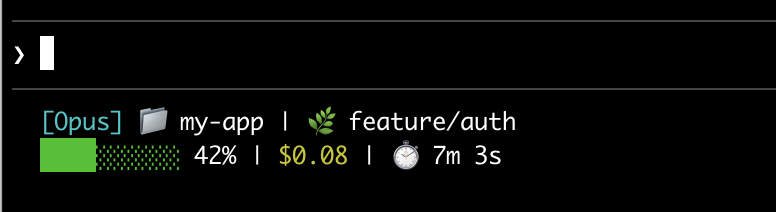
This page walks through setting up a basic status line, explains how the data flows from Claude Code to your script, lists all the fields you can display, and provides ready-to-use examples for common patterns like git status, cost tracking, and progress bars.
Set up a status line
Use the /statusline command to have Claude Code generate a script for you, or manually create a script and add it to your settings.
Use the /statusline command
The /statusline command accepts natural language instructions describing what you want displayed. Claude Code generates a script file in ~/.claude/ and updates your settings automatically:
/statusline show model name and context percentage with a progress bar
Approve the file edit prompts if Claude Code asks for permission during setup.
Manually configure a status line
Add a statusLine field to your user settings (~/.claude/settings.json, where ~ is your home directory) or project settings. Set type to "command" and point command to a script path or an inline shell command. For a full walkthrough of creating a script, see Build a status line step by step.
{
  "statusLine": {
    "type": "command",
    "command": "~/.claude/statusline.sh",
    "padding": 2
  }
}
The command field runs in a shell, so you can also use inline commands instead of a script file. This example uses jq to parse the JSON input and display the model name and context percentage:
{
  "statusLine": {
    "type": "command",
    "command": "jq -r '\"[\\(.model.display_name)] \\(.context_window.used_percentage // 0)% context\"'"
  }
}
The optional padding field adds extra horizontal spacing (in characters) to the status line content. Defaults to 0. This padding is in addition to the interface's built-in spacing, so it controls relative indentation rather than absolute distance from the terminal edge.
The optional refreshInterval field re-runs your command every N seconds in addition to the event-driven updates. The minimum is 1. Set this when your status line shows time-based data such as a clock, or when background subagents change git state while the main session is idle. Leave it unset to run only on events.
The optional hideVimModeIndicator field suppresses the built-in -- INSERT -- text below the prompt. Set this to true when your script renders vim.mode itself, so the mode is not shown twice.
Disable the status line
Run /statusline and ask it to remove or clear your status line (for example, /statusline delete, /statusline clear, /statusline remove it). You can also manually delete the statusLine field from your settings.json.
Build a status line step by step
This walkthrough shows what /statusline sets up for you by manually creating a status line that displays the current model, working directory, and context window usage percentage.
Running /statusline with a description of what you want configures all of this for you automatically.
These examples use Bash scripts, which work on macOS and Linux. On Windows, see Windows configuration for PowerShell and Git Bash examples.
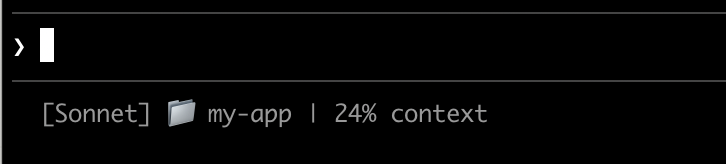
Create a script that reads JSON and prints output
Claude Code sends JSON data to your script via stdin. This script uses jq, a command-line JSON parser you may need to install, to extract the model name, directory, and context percentage, then prints a formatted line.
Save this to ~/.claude/statusline.sh (where ~ is your home directory, such as /Users/username on macOS or /home/username on Linux):
#!/bin/bash
# Read JSON data that Claude Code sends to stdin
input=$(cat)

# Extract fields using jq
MODEL=$(echo "$input" | jq -r '.model.display_name')
DIR=$(echo "$input" | jq -r '.workspace.current_dir')
# The "// 0" provides a fallback if the field is null
PCT=$(echo "$input" | jq -r '.context_window.used_percentage // 0' | cut -d. -f1)

# Output the status line - ${DIR##*/} extracts just the folder name
echo "[$MODEL] 📁 ${DIR##*/} | ${PCT}% context"
Make it executable
Mark the script as executable so your shell can run it:
chmod +x ~/.claude/statusline.sh
Add to settings
Tell Claude Code to run your script as the status line. Add this configuration to ~/.claude/settings.json, which sets type to "command" (meaning "run this shell command") and points command to your script:
{
  "statusLine": {
    "type": "command",
    "command": "~/.claude/statusline.sh"
  }
}
Your status line appears at the bottom of the interface. Claude Code reloads settings automatically and runs your script as soon as you save the file.
How status lines work
Claude Code runs your script with JSON session data on stdin and displays whatever the script prints to stdout.
When it updates
Your script runs once when a session starts, including when you resume one. After that, it runs again when:
- A new assistant message arrives
/compactfinishes- The permission mode changes
- Vim mode toggles
- You change the
commandin yourstatusLinesettings - A
refreshIntervaltimer elapses, if you set one - A rate-limit window in the data your script last received reaches its
resets_attime - A warm prompt cache in the data your script last received reaches its
expires_attime
Claude Code debounces updates at 300ms, so rapid changes batch together and your script runs once after the changes stop. A change to the command itself skips the debounce: Claude Code runs the new command right away. If a new update triggers while your script is still running, Claude Code cancels the in-flight script. If you edit your script, the changes appear the next time an update trigger re-runs it.
The event-driven triggers can go quiet when the main session is idle, for example while a coordinator waits on background subagents. To keep time-based or externally-sourced segments current during idle periods, set refreshInterval to also re-run the command on a fixed timer.
What your script can output
- Multiple lines: each
echoorprintstatement displays as a separate row. See the multi-line example. - Colors: use ANSI escape codes like
\033[32mfor green (terminal must support them). See the git status example. - Links: use OSC 8 escape sequences to make text clickable (Cmd+click on macOS, Ctrl+click on Windows/Linux). Requires a terminal that supports hyperlinks like iTerm2, Kitty, or WezTerm. See the clickable links example.
Sizing output to the terminal
Claude Code captures your script's output instead of connecting it directly to the terminal, so tput cols and language-level width detection cannot read the terminal size from inside the script. Read the COLUMNS and LINES environment variables instead. Claude Code sets these to the current terminal dimensions before running your script.
The status line runs locally and does not consume API tokens. It temporarily hides during certain UI interactions, including autocomplete suggestions, the help menu, and permission prompts.
Available data
Claude Code sends the following JSON fields to your script via stdin:
| Field | Description |
|---|---|
model.id, model.display_name |
Current model identifier and display name |
cwd, workspace.current_dir |
Current working directory. Both fields contain the same value; workspace.current_dir is preferred for consistency with workspace.project_dir. |
workspace.project_dir |
Directory where Claude Code was launched, which may differ from cwd if the working directory changes during a session |
workspace.added_dirs |
Additional directories added via /add-dir or --add-dir. Empty array if none have been added |
workspace.git_worktree |
Git worktree name when the current directory is inside a linked worktree created with git worktree add. Absent in the main working tree. Populated for any git worktree, unlike worktree.*, which is present only while the session is in a worktree session |
workspace.repo.host, workspace.repo.owner, workspace.repo.name |
Repository identity parsed from the origin remote, for example, "github.com", "anthropics", "claude-code". Absent outside a git repository or when no origin remote is configured. For a gitlab.com project nested in subgroups, owner is the full namespace path with slashes, such as "group/subgroup". Before v2.1.260, workspace.repo was absent for these projects |
cost.total_cost_usd |
Estimated session cost in USD, computed client-side at list price unless a modelPricing table is in effect. May differ from your actual bill. Resets to $0 when /clear starts a new session. Before v2.1.211, the total carried over after /clear |
cost.total_duration_ms |
Total wall-clock time the session has been running, in milliseconds. Accumulates across resumes and doesn't include time while the session isn't running |
cost.total_api_duration_ms |
Total time spent waiting for API responses in milliseconds |
cost.total_lines_added, cost.total_lines_removed |
Lines of code changed |
context_window.total_input_tokens, context_window.total_output_tokens |
Token counts currently in the context window, from the most recent API response. Input includes cache reads and writes |
context_window.context_window_size |
Maximum context window size in tokens. 200000 by default, or 1000000 for models with extended context. |
context_window.used_percentage |
Pre-calculated percentage of context window used |
context_window.remaining_percentage |
Pre-calculated percentage of context window remaining |
context_window.current_usage |
Token counts from the last API call, described in context window fields |
exceeds_200k_tokens |
Whether the total token count (input, cache, and output tokens combined) from the most recent API response exceeds 200k. This is a fixed threshold regardless of actual context window size. |
fast_mode |
Whether fast mode is enabled for the session |
effort.level |
Current reasoning effort (low, medium, high, xhigh, or max). Reflects the live session value, including mid-session /effort changes. Ultracode is not a distinct level and reports as xhigh. Absent when the current model does not support the effort parameter |
thinking.enabled |
Whether extended thinking is enabled for the session |
rate_limits.five_hour.used_percentage, rate_limits.seven_day.used_percentage |
Percentage of the 5-hour or 7-day rate limit consumed, from 0 to 100 |
rate_limits.five_hour.resets_at, rate_limits.seven_day.resets_at |
Unix epoch seconds when the 5-hour or 7-day rate limit window resets |
rate_limits.spend_limit.used_percentage, rate_limits.spend_limit.resets_at |
Behind a Claude apps gateway, the percentage used of the spend limit that applies to you, and the Unix epoch seconds when its period resets. The percentage runs from 0 to 100, or above 100 once you exceed the limit. Requires Claude Code v2.1.251 or later |
prompt_cache |
The session's prompt cache statistics for the main conversation: hit ratio, misses, and whether the cache is warm. See prompt cache fields for every field. Absent until the main conversation's first API response. Requires Claude Code v2.1.251 or later |
session_id |
Unique session identifier |
session_name |
Session name. Uses the custom name set with the --name flag or /rename when one exists, otherwise the AI-generated session title. The default display name, such as my-app-3f, doesn't populate this field. Absent when the session has neither a custom name nor an AI-generated title |
prompt_id |
UUID identifying the user prompt currently being processed. Matches the prompt.id attribute on OpenTelemetry events. Absent until the first user input. Requires Claude Code v2.1.196 or later |
transcript_path |
Path to conversation transcript file |
version |
Claude Code version |
output_style.name |
Name of the current output style |
vim.mode |
Current vim mode (NORMAL, INSERT, VISUAL, or VISUAL LINE) when vim mode is enabled |
agent.name |
Agent name when running with the --agent flag or agent settings configured |
pr.number, pr.url |
Open pull request for the current branch. Mirrors the PR badge in the footer. In a repository with a GitLab remote, Claude Code fills these fields from the branch's open merge request instead, so pr.number is the merge request number. Merge request data requires Claude Code v2.1.234 or later. Absent when not in a git repository, until a pull request or merge request is found, or once it merges or closes |
pr.review_state |
Review status of the open PR: approved, pending, changes_requested, or draft. May be independently absent even when pr is present |
pr.kind |
mr when pr describes a GitLab merge request. Absent for GitHub pull requests, so scripts written before this field keep working. For a merge request, Claude Code sets review_state to approved when GitLab reports it mergeable, pending for any other open state, and draft for a draft. Requires Claude Code v2.1.234 or later |
worktree.name |
Name of the active worktree. Present only while the session is in a worktree session |
worktree.path |
Absolute path to the worktree directory |
worktree.branch |
Git branch name for the worktree (for example, "worktree-my-feature"). Absent for hook-based worktrees |
worktree.original_cwd |
The directory Claude was in before entering the worktree |
worktree.original_branch |
Git branch checked out before entering the worktree. Absent for hook-based worktrees |
Full JSON schema
Your status line command receives this JSON structure via stdin:
{
  "cwd": "/current/working/directory",
  "session_id": "abc123...",
  "session_name": "my-session",
  "prompt_id": "550e8400-e29b-41d4-a716-446655440000",
  "transcript_path": "/path/to/transcript.jsonl",
  "model": {
    "id": "claude-opus-5-5",
    "display_name": "Opus"
  },
  "workspace": {
    "current_dir": "/current/working/directory",
    "project_dir": "/original/project/directory",
    "added_dirs": [],
    "git_worktree": "feature-xyz",
    "repo": {
      "host": "github.com",
      "owner": "anthropics",
      "name": "claude-code"
    }
  },
  "version": "2.1.90",
  "output_style": {
    "name": "default"
  },
  "cost": {
    "total_cost_usd": 0.01234,
    "total_duration_ms": 45000,
    "total_api_duration_ms": 2300,
    "total_lines_added": 156,
    "total_lines_removed": 23
  },
  "context_window": {
    "total_input_tokens": 15500,
    "total_output_tokens": 1200,
    "context_window_size": 200000,
    "used_percentage": 8,
    "remaining_percentage": 92,
    "current_usage": {
      "input_tokens": 8500,
      "output_tokens": 1200,
      "cache_creation_input_tokens": 5000,
      "cache_read_input_tokens": 2000
    }
  },
  "exceeds_200k_tokens": false,
  "prompt_cache": {
    "warm": true,
    "caching_observed": true,
    "ttl": "1h",
    "expires_at": 1738429200,
    "requests": 14,
    "misses": 2,
    "expected_rebuilds": 1,
    "hit_ratio": 0.91,
    "cache_write_tokens": 352000,
    "miss_recache_tokens": 310200,
    "last_miss_at": 1738425230,
    "last_miss_cause": {
      "causes": ["tools_changed"],
      "tools_added": 2,
      "tools_removed": 0
    },
    "miss_causes": {
      "tools_changed": 2
    },
    "recache_tokens_if_cold": 45000
  },
  "fast_mode": false,
  "effort": {
    "level": "high"
  },
  "thinking": {
    "enabled": true
  },
  "rate_limits": {
    "five_hour": {
      "used_percentage": 23.5,
      "resets_at": 1738425600
    },
    "seven_day": {
      "used_percentage": 41.2,
      "resets_at": 1738857600
    },
    "spend_limit": {
      "used_percentage": 62.8,
      "resets_at": 1740787200
    }
  },
  "vim": {
    "mode": "NORMAL"
  },
  "agent": {
    "name": "security-reviewer"
  },
  "pr": {
    "number": 1234,
    "url": "https://github.com/anthropics/claude-code/pull/1234",
    "review_state": "pending"
  },
  "worktree": {
    "name": "my-feature",
    "path": "/path/to/.claude/worktrees/my-feature",
    "branch": "worktree-my-feature",
    "original_cwd": "/path/to/project",
    "original_branch": "main"
  }
}
Fields that may be absent (not present in JSON):
session_name: appears when a custom name has been set with--nameor/rename, or once an AI-generated session title exists. The default display name, such asmy-app-3f, doesn't populate itprompt_id: appears only after the first user inputworkspace.git_worktree: appears only when the current directory is inside a linked git worktreeworkspace.repo: appears only inside a git repository with anoriginremote configuredeffort: appears only when the current model supports the reasoning effort parametervim: appears only when vim mode is enabledagent: appears only when running with the--agentflag or agent settings configuredpr: appears only while an open PR or GitLab merge request is found for the current branch, and is removed once it merges or closes.pr.review_stateandpr.kindmay be independently absentworktree: appears only while the session is in a worktree session. When present,branchandoriginal_branchmay also be absent for hook-based worktreesrate_limits: appears only for claude.ai Pro and Max subscribers, or behind a Claude apps gateway that sets a spend limit for you, and only after the first API response in the session. Each window (five_hour,seven_day,spend_limit) may be independently absent, and Claude Code drops a window once itsresets_attime passes. Usejq -r '.rate_limits.five_hour.used_percentage // empty'to handle absence gracefully.prompt_cache: appears after the main conversation's first API response. See prompt cache fields
Fields that may be null:
context_window.current_usage:nullbefore the first API call in a session, and again after/compactuntil the next API call repopulates itcontext_window.used_percentage,context_window.remaining_percentage: may benullearly in the session
Handle missing fields with conditional access and null values with fallback defaults in your scripts.
Context window fields
The context_window object describes the live context window from the most recent API response.
- Combined totals (
total_input_tokens,total_output_tokens): tokens currently in the context window.total_input_tokensis the sum ofinput_tokens,cache_creation_input_tokens, andcache_read_input_tokens;total_output_tokensis the output tokens from the most recent response. Both are0before the first API response. - Per-component usage (
current_usage): the same token counts broken out by category. Use this when you need cache hits separate from fresh input.
The current_usage object contains:
input_tokens: input tokens in current contextoutput_tokens: output tokens generatedcache_creation_input_tokens: tokens written to cachecache_read_input_tokens: tokens read from cache
For what the cache fields mean and how they're billed, see check cache performance.
The used_percentage field is calculated from input tokens only: input_tokens + cache_creation_input_tokens + cache_read_input_tokens. It does not include output_tokens.
If you calculate context percentage manually from current_usage, use the same input-only formula to match used_percentage.
The current_usage object is null before the first API call in a session, and again immediately after /compact until the next API call repopulates it.
Prompt cache fields
The prompt_cache object summarizes how the session's main conversation is using the prompt cache. Claude Code computes it from the cache token counts in the API's responses, so it works on every provider.
The object appears after the main conversation's first API response. Claude Code doesn't count subagent requests in these statistics. Requires Claude Code v2.1.251 or later.
The table lists each field with its meaning. Timestamps are Unix epoch seconds, the same unit as rate_limits.*.resets_at. A short status line usually shows one or two of these; warm and hit_ratio summarize the cache state most directly.
| Field | Description |
|---|---|
warm |
Whether the cached prefix is still within its TTL. false when the last response reported no cache tokens, even while caching_observed is true |
caching_observed |
Whether any response this session reported cache tokens. false means prompt caching is off, or your provider or gateway doesn't report it |
ttl |
Cache lifetime of the current cached prefix: "5m" or "1h" |
expires_at |
When the cached prefix leaves its TTL and goes cold, in epoch seconds. null when the last response reported no cache tokens |
requests |
API requests recorded for the main conversation this session |
misses |
Requests that re-processed content the cache already held: more than 5% and at least 2,000 tokens of what the request could have read from cache, with no compaction or tool-result clearing to explain the shortfall in cache reads |
expected_rebuilds |
Cache rebuilds that followed a compaction or a clearing of old tool results |
hit_ratio |
Cache read tokens as a fraction of all input tokens this session, from 0 to 1. The denominator counts cache reads, cache writes, and uncached input. null while those counts are all zero |
cache_write_tokens |
All tokens written to the cache this session, the first request's initial write included |
miss_recache_tokens |
Tokens written to the cache by the requests counted as misses |
last_miss_at |
When the last miss happened, in epoch seconds. null while the session has no misses |
last_miss_cause |
What Claude Code identified as the likely cause of the last miss, described under Last miss cause. Requires Claude Code v2.1.260 or later |
miss_causes |
How many of this session's diagnosed misses had each cause, keyed by the same cause names as last_miss_cause. Requires Claude Code v2.1.260 or later |
recache_tokens_if_cold |
Tokens the next request re-caches if the cache has gone cold by then. null right after a compaction or a clearing of old tool results, until the next request records the rewritten conversation's size |
Claude Code shows the same statistics in the terminal, on the /usage command's Prompt cache (main) line.
Last miss cause
The last_miss_cause object reports what Claude Code identified as the likely cause of the most recent miss. Its causes array holds one or more cause names, such as tools_changed, system_prompt_changed, ttl_expired_5m, or likely_server_side. The object is null until the session's first miss, and again whenever Claude Code couldn't identify a cause for the most recent miss. Requires Claude Code v2.1.260 or later.
Two causes add counts to the object:
tools_addedandtools_removed: withtools_changed, how many tools were added to or removed from the requestsystem_char_delta: withsystem_prompt_changed, the change in the system prompt's length, in characters
Examples
These examples show common status line patterns. To use any example:
- Save the script to a file like
~/.claude/statusline.sh(or.py/.js) - Make it executable:
chmod +x ~/.claude/statusline.sh - Add the path to your settings
The Bash examples use jq to parse JSON. Python and Node.js have built-in JSON parsing.
Context window usage
Display the current model and context window usage with a visual progress bar. Each script reads JSON from stdin, extracts the used_percentage field, and builds a 10-character bar where filled blocks (▓) represent usage:
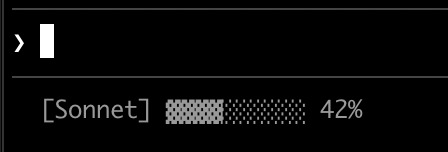
#!/bin/bash
# Read all of stdin into a variable
input=$(cat)

# Extract fields with jq, "// 0" provides fallback for null
MODEL=$(echo "$input" | jq -r '.model.display_name')
PCT=$(echo "$input" | jq -r '.context_window.used_percentage // 0' | cut -d. -f1)

# Build progress bar: printf -v creates a run of spaces, then
# ${var// /▓} replaces each space with a block character
BAR_WIDTH=10
FILLED=$((PCT * BAR_WIDTH / 100))
EMPTY=$((BAR_WIDTH - FILLED))
BAR=""
[ "$FILLED" -gt 0 ] && printf -v FILL "%${FILLED}s" && BAR="${FILL// /▓}"
[ "$EMPTY" -gt 0 ] && printf -v PAD "%${EMPTY}s" && BAR="${BAR}${PAD// /░}"

echo "[$MODEL] $BAR $PCT%"
#!/usr/bin/env python3
import json, sys

# json.load reads and parses stdin in one step
data = json.load(sys.stdin)
model = data['model']['display_name']
# "or 0" handles null values
pct = int(data.get('context_window', {}).get('used_percentage', 0) or 0)

# String multiplication builds the bar
filled = pct * 10 // 100
bar = '▓' * filled + '░' * (10 - filled)

print(f"[{model}] {bar} {pct}%")
#!/usr/bin/env node
// Node.js reads stdin asynchronously with events
let input = '';
process.stdin.on('data', chunk => input += chunk);
process.stdin.on('end', () => {
    const data = JSON.parse(input);
    const model = data.model.display_name;
    // Optional chaining (?.) safely handles null fields
    const pct = Math.floor(data.context_window?.used_percentage || 0);

    // String.repeat() builds the bar
    const filled = Math.floor(pct * 10 / 100);
    const bar = '▓'.repeat(filled) + '░'.repeat(10 - filled);

    console.log(`[${model}] ${bar} ${pct}%`);
});
Git status with colors
Show git branch with color-coded indicators for staged and modified files. This script uses ANSI escape codes for terminal colors: \033[32m is green, \033[33m is yellow, and \033[0m resets to default.
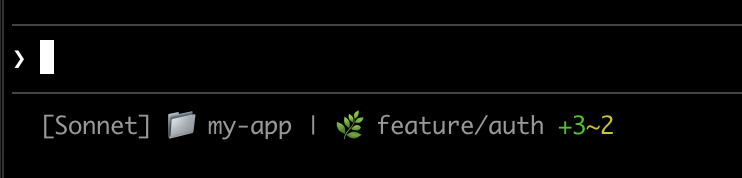
Each script checks if the current directory is a git repository, counts staged and modified files, and displays color-coded indicators:
#!/bin/bash
input=$(cat)

MODEL=$(echo "$input" | jq -r '.model.display_name')
DIR=$(echo "$input" | jq -r '.workspace.current_dir')

GREEN='\033[32m'
YELLOW='\033[33m'
RESET='\033[0m'

if git rev-parse --git-dir > /dev/null 2>&1; then
    BRANCH=$(git branch --show-current 2>/dev/null)
    STAGED=$(git diff --cached --numstat 2>/dev/null | wc -l | tr -d ' ')
    MODIFIED=$(git diff --numstat 2>/dev/null | wc -l | tr -d ' ')

    GIT_STATUS=""
    [ "$STAGED" -gt 0 ] && GIT_STATUS="${GREEN}+${STAGED}${RESET}"
    [ "$MODIFIED" -gt 0 ] && GIT_STATUS="${GIT_STATUS}${YELLOW}~${MODIFIED}${RESET}"

    echo -e "[$MODEL] 📁 ${DIR##*/} | 🌿 $BRANCH $GIT_STATUS"
else
    echo "[$MODEL] 📁 ${DIR##*/}"
fi
#!/usr/bin/env python3
import json, sys, subprocess, os

data = json.load(sys.stdin)
model = data['model']['display_name']
directory = os.path.basename(data['workspace']['current_dir'])

GREEN, YELLOW, RESET = '\033[32m', '\033[33m', '\033[0m'

try:
    subprocess.check_output(['git', 'rev-parse', '--git-dir'], stderr=subprocess.DEVNULL)
    branch = subprocess.check_output(['git', 'branch', '--show-current'], text=True).strip()
    staged_output = subprocess.check_output(['git', 'diff', '--cached', '--numstat'], text=True).strip()
    modified_output = subprocess.check_output(['git', 'diff', '--numstat'], text=True).strip()
    staged = len(staged_output.split('\n')) if staged_output else 0
    modified = len(modified_output.split('\n')) if modified_output else 0

    git_status = f"{GREEN}+{staged}{RESET}" if staged else ""
    git_status += f"{YELLOW}~{modified}{RESET}" if modified else ""

    print(f"[{model}] 📁 {directory} | 🌿 {branch} {git_status}")
except:
    print(f"[{model}] 📁 {directory}")
#!/usr/bin/env node
const { execSync } = require('child_process');
const path = require('path');

let input = '';
process.stdin.on('data', chunk => input += chunk);
process.stdin.on('end', () => {
    const data = JSON.parse(input);
    const model = data.model.display_name;
    const dir = path.basename(data.workspace.current_dir);

    const GREEN = '\x1b[32m', YELLOW = '\x1b[33m', RESET = '\x1b[0m';

    try {
        execSync('git rev-parse --git-dir', { stdio: 'ignore' });
        const branch = execSync('git branch --show-current', { encoding: 'utf8' }).trim();
        const staged = execSync('git diff --cached --numstat', { encoding: 'utf8' }).trim().split('\n').filter(Boolean).length;
        const modified = execSync('git diff --numstat', { encoding: 'utf8' }).trim().split('\n').filter(Boolean).length;

        let gitStatus = staged ? `${GREEN}+${staged}${RESET}` : '';
        gitStatus += modified ? `${YELLOW}~${modified}${RESET}` : '';

        console.log(`[${model}] 📁 ${dir} | 🌿 ${branch} ${gitStatus}`);
    } catch {
        console.log(`[${model}] 📁 ${dir}`);
    }
});
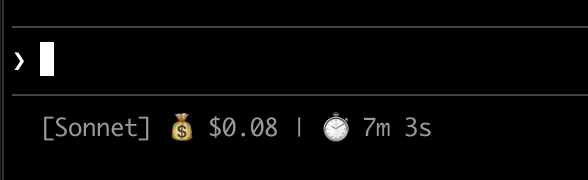
Cost and duration tracking
Track your session's API costs and elapsed time. The cost.total_cost_usd field accumulates the estimated cost of all API calls in the current session. The cost.total_duration_ms field measures the total time the session has been running, while cost.total_api_duration_ms tracks only the time spent waiting for API responses.
Each script formats cost as currency and converts milliseconds to minutes and seconds:
#!/bin/bash
input=$(cat)

MODEL=$(echo "$input" | jq -r '.model.display_name')
COST=$(echo "$input" | jq -r '.cost.total_cost_usd // 0')
DURATION_MS=$(echo "$input" | jq -r '.cost.total_duration_ms // 0')

COST_FMT=$(printf '$%.2f' "$COST")
DURATION_SEC=$((DURATION_MS / 1000))
MINS=$((DURATION_SEC / 60))
SECS=$((DURATION_SEC % 60))

echo "[$MODEL] 💰 $COST_FMT | ⏱️ ${MINS}m ${SECS}s"
#!/usr/bin/env python3
import json, sys

data = json.load(sys.stdin)
model = data['model']['display_name']
cost = data.get('cost', {}).get('total_cost_usd', 0) or 0
duration_ms = data.get('cost', {}).get('total_duration_ms', 0) or 0

duration_sec = duration_ms // 1000
mins, secs = duration_sec // 60, duration_sec % 60

print(f"[{model}] 💰 ${cost:.2f} | ⏱️ {mins}m {secs}s")
#!/usr/bin/env node
let input = '';
process.stdin.on('data', chunk => input += chunk);
process.stdin.on('end', () => {
    const data = JSON.parse(input);
    const model = data.model.display_name;
    const cost = data.cost?.total_cost_usd || 0;
    const durationMs = data.cost?.total_duration_ms || 0;

    const durationSec = Math.floor(durationMs / 1000);
    const mins = Math.floor(durationSec / 60);
    const secs = durationSec % 60;

    console.log(`[${model}] 💰 $${cost.toFixed(2)} | ⏱️ ${mins}m ${secs}s`);
});
Display multiple lines
Your script can output multiple lines to create a richer display.
This example combines several techniques: threshold-based colors (green under 70%, yellow 70-89%, red 90%+), a progress bar, and git branch info. Each print or echo statement creates a separate row:
#!/bin/bash
input=$(cat)

MODEL=$(echo "$input" | jq -r '.model.display_name')
DIR=$(echo "$input" | jq -r '.workspace.current_dir')
COST=$(echo "$input" | jq -r '.cost.total_cost_usd // 0')
PCT=$(echo "$input" | jq -r '.context_window.used_percentage // 0' | cut -d. -f1)
DURATION_MS=$(echo "$input" | jq -r '.cost.total_duration_ms // 0')

CYAN='\033[36m'; GREEN='\033[32m'; YELLOW='\033[33m'; RED='\033[31m'; RESET='\033[0m'

# Pick bar color based on context usage
if [ "$PCT" -ge 90 ]; then BAR_COLOR="$RED"
elif [ "$PCT" -ge 70 ]; then BAR_COLOR="$YELLOW"
else BAR_COLOR="$GREEN"; fi

FILLED=$((PCT / 10)); EMPTY=$((10 - FILLED))
printf -v FILL "%${FILLED}s"; printf -v PAD "%${EMPTY}s"
BAR="${FILL// /█}${PAD// /░}"

MINS=$((DURATION_MS / 60000)); SECS=$(((DURATION_MS % 60000) / 1000))

BRANCH=""
git rev-parse --git-dir > /dev/null 2>&1 && BRANCH=" | 🌿 $(git branch --show-current 2>/dev/null)"

echo -e "${CYAN}[$MODEL]${RESET} 📁 ${DIR##*/}$BRANCH"
COST_FMT=$(printf '$%.2f' "$COST")
echo -e "${BAR_COLOR}${BAR}${RESET} ${PCT}% | ${YELLOW}${COST_FMT}${RESET} | ⏱️ ${MINS}m ${SECS}s"
#!/usr/bin/env python3
import json, sys, subprocess, os

data = json.load(sys.stdin)
model = data['model']['display_name']
directory = os.path.basename(data['workspace']['current_dir'])
cost = data.get('cost', {}).get('total_cost_usd', 0) or 0
pct = int(data.get('context_window', {}).get('used_percentage', 0) or 0)
duration_ms = data.get('cost', {}).get('total_duration_ms', 0) or 0

CYAN, GREEN, YELLOW, RED, RESET = '\033[36m', '\033[32m', '\033[33m', '\033[31m', '\033[0m'

bar_color = RED if pct >= 90 else YELLOW if pct >= 70 else GREEN
filled = pct // 10
bar = '█' * filled + '░' * (10 - filled)

mins, secs = duration_ms // 60000, (duration_ms % 60000) // 1000

try:
    branch = subprocess.check_output(['git', 'branch', '--show-current'], text=True, stderr=subprocess.DEVNULL).strip()
    branch = f" | 🌿 {branch}" if branch else ""
except:
    branch = ""

print(f"{CYAN}[{model}]{RESET} 📁 {directory}{branch}")
print(f"{bar_color}{bar}{RESET} {pct}% | {YELLOW}${cost:.2f}{RESET} | ⏱️ {mins}m {secs}s")
#!/usr/bin/env node
const { execSync } = require('child_process');
const path = require('path');

let input = '';
process.stdin.on('data', chunk => input += chunk);
process.stdin.on('end', () => {
    const data = JSON.parse(input);
    const model = data.model.display_name;
    const dir = path.basename(data.workspace.current_dir);
    const cost = data.cost?.total_cost_usd || 0;
    const pct = Math.floor(data.context_window?.used_percentage || 0);
    const durationMs = data.cost?.total_duration_ms || 0;

    const CYAN = '\x1b[36m', GREEN = '\x1b[32m', YELLOW = '\x1b[33m', RED = '\x1b[31m', RESET = '\x1b[0m';

    const barColor = pct >= 90 ? RED : pct >= 70 ? YELLOW : GREEN;
    const filled = Math.floor(pct / 10);
    const bar = '█'.repeat(filled) + '░'.repeat(10 - filled);

    const mins = Math.floor(durationMs / 60000);
    const secs = Math.floor((durationMs % 60000) / 1000);

    let branch = '';
    try {
        branch = execSync('git branch --show-current', { encoding: 'utf8', stdio: ['pipe', 'pipe', 'ignore'] }).trim();
        branch = branch ? ` | 🌿 ${branch}` : '';
    } catch {}

    console.log(`${CYAN}[${model}]${RESET} 📁 ${dir}${branch}`);
    console.log(`${barColor}${bar}${RESET} ${pct}% | ${YELLOW}$${cost.toFixed(2)}${RESET} | ⏱️ ${mins}m ${secs}s`);
});
Clickable links
This example creates a clickable link to your GitHub repository. Hold Cmd (macOS) or Ctrl (Windows/Linux) and click to open the link in your browser.
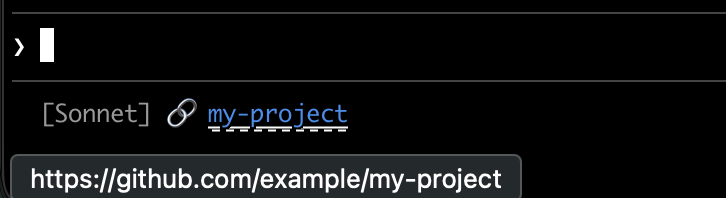
Each script gets the git remote URL, converts SSH format to HTTPS, and wraps the repo name in OSC 8 escape codes. The Bash version uses printf '%b' which interprets backslash escapes more reliably than echo -e across different shells:
#!/bin/bash
input=$(cat)

MODEL=$(echo "$input" | jq -r '.model.display_name')

# Convert git SSH URL to HTTPS
REMOTE=$(git remote get-url origin 2>/dev/null | sed 's/[email protected]:/https:\/\/github.com\//' | sed 's/\.git$//')

if [ -n "$REMOTE" ]; then
    REPO_NAME=$(basename "$REMOTE")
    # OSC 8 format: \e]8;;URL\a then TEXT then \e]8;;\a
    # printf %b interprets escape sequences reliably across shells
    printf '%b' "[$MODEL] 🔗 \e]8;;${REMOTE}\a${REPO_NAME}\e]8;;\a\n"
else
    echo "[$MODEL]"
fi
#!/usr/bin/env python3
import json, sys, subprocess, re, os

data = json.load(sys.stdin)
model = data['model']['display_name']

# Get git remote URL
try:
    remote = subprocess.check_output(
        ['git', 'remote', 'get-url', 'origin'],
        stderr=subprocess.DEVNULL, text=True
    ).strip()
    # Convert SSH to HTTPS format
    remote = re.sub(r'^git@github\.com:', 'https://github.com/', remote)
    remote = re.sub(r'\.git$', '', remote)
    repo_name = os.path.basename(remote)
    # OSC 8 escape sequences
    link = f"\033]8;;{remote}\a{repo_name}\033]8;;\a"
    print(f"[{model}] 🔗 {link}")
except:
    print(f"[{model}]")
#!/usr/bin/env node
const { execSync } = require('child_process');
const path = require('path');

let input = '';
process.stdin.on('data', chunk => input += chunk);
process.stdin.on('end', () => {
    const data = JSON.parse(input);
    const model = data.model.display_name;

    try {
        let remote = execSync('git remote get-url origin', { encoding: 'utf8', stdio: ['pipe', 'pipe', 'ignore'] }).trim();
        // Convert SSH to HTTPS format
        remote = remote.replace(/^git@github\.com:/, 'https://github.com/').replace(/\.git$/, '');
        const repoName = path.basename(remote);
        // OSC 8 escape sequences
        const link = `\x1b]8;;${remote}\x07${repoName}\x1b]8;;\x07`;
        console.log(`[${model}] 🔗 ${link}`);
    } catch {
        console.log(`[${model}]`);
    }
});
Rate limit usage
Display claude.ai subscription rate limit usage in the status line. The rate_limits object contains a rolling five_hour window and a weekly seven_day window. Each window provides used_percentage, from 0 to 100, and resets_at, the Unix epoch seconds when the window resets.
Behind a Claude apps gateway with spend limits, rate_limits carries spend_limit with the same two fields for the spend limit that applies to you, except that its used_percentage can go above 100 once you exceed the limit. Requires Claude Code v2.1.251 or later.
The rate_limits object is only present for claude.ai Pro and Max subscribers, or behind a Claude apps gateway with spend limits, and only after the first API response. Each script handles the absent field gracefully:
#!/bin/bash
input=$(cat)

MODEL=$(echo "$input" | jq -r '.model.display_name')
# "// empty" produces no output when rate_limits is absent
FIVE_H=$(echo "$input" | jq -r '.rate_limits.five_hour.used_percentage // empty')
WEEK=$(echo "$input" | jq -r '.rate_limits.seven_day.used_percentage // empty')

LIMITS=""
[ -n "$FIVE_H" ] && LIMITS="5h: $(printf '%.0f' "$FIVE_H")%"
[ -n "$WEEK" ] && LIMITS="${LIMITS:+$LIMITS }7d: $(printf '%.0f' "$WEEK")%"

[ -n "$LIMITS" ] && echo "[$MODEL] | $LIMITS" || echo "[$MODEL]"
#!/usr/bin/env python3
import json, sys

data = json.load(sys.stdin)
model = data['model']['display_name']

parts = []
rate = data.get('rate_limits', {})
five_h = rate.get('five_hour', {}).get('used_percentage')
week = rate.get('seven_day', {}).get('used_percentage')

if five_h is not None:
    parts.append(f"5h: {five_h:.0f}%")
if week is not None:
    parts.append(f"7d: {week:.0f}%")

if parts:
    print(f"[{model}] | {' '.join(parts)}")
else:
    print(f"[{model}]")
#!/usr/bin/env node
let input = '';
process.stdin.on('data', chunk => input += chunk);
process.stdin.on('end', () => {
    const data = JSON.parse(input);
    const model = data.model.display_name;

    const parts = [];
    const fiveH = data.rate_limits?.five_hour?.used_percentage;
    const week = data.rate_limits?.seven_day?.used_percentage;

    if (fiveH != null) parts.push(`5h: ${Math.round(fiveH)}%`);
    if (week != null) parts.push(`7d: ${Math.round(week)}%`);

    console.log(parts.length ? `[${model}] | ${parts.join(' ')}` : `[${model}]`);
});
Cache expensive operations
Your status line script runs frequently during active sessions. Commands like git status or git diff can be slow, especially in large repositories. This example caches git information to a temp file and only refreshes it every 5 seconds.
The cache filename needs to be stable across status line invocations within a session, but unique across sessions so concurrent sessions in different repositories don't read each other's cached git state. Process-based identifiers like $$, os.getpid(), or process.pid change on every invocation and defeat the cache. Use the session_id from the JSON input instead: it's stable for the lifetime of a session and unique per session.
Each script checks if the cache file is missing or older than 5 seconds before running git commands:
#!/bin/bash
input=$(cat)

MODEL=$(echo "$input" | jq -r '.model.display_name')
DIR=$(echo "$input" | jq -r '.workspace.current_dir')
SESSION_ID=$(echo "$input" | jq -r '.session_id')

CACHE_FILE="/tmp/statusline-git-cache-$SESSION_ID"
CACHE_MAX_AGE=5  # seconds

cache_is_stale() {
    [ ! -f "$CACHE_FILE" ] || \
    # stat -c %Y (Linux) or stat -f %m (macOS) prints the file's last-modified
    # time. The Linux form must run first: on Linux, the macOS form prints a
    # filesystem report to stdout before failing, and that output would be
    # captured by the command substitution and break the arithmetic.
    [ $(($(date +%s) - $(stat -c %Y "$CACHE_FILE" 2>/dev/null || stat -f %m "$CACHE_FILE" 2>/dev/null || echo 0))) -gt $CACHE_MAX_AGE ]
}

if cache_is_stale; then
    if git rev-parse --git-dir > /dev/null 2>&1; then
        BRANCH=$(git branch --show-current 2>/dev/null)
        STAGED=$(git diff --cached --numstat 2>/dev/null | wc -l | tr -d ' ')
        MODIFIED=$(git diff --numstat 2>/dev/null | wc -l | tr -d ' ')
        echo "$BRANCH|$STAGED|$MODIFIED" > "$CACHE_FILE"
    else
        echo "||" > "$CACHE_FILE"
    fi
fi

IFS='|' read -r BRANCH STAGED MODIFIED < "$CACHE_FILE"

if [ -n "$BRANCH" ]; then
    echo "[$MODEL] 📁 ${DIR##*/} | 🌿 $BRANCH +$STAGED ~$MODIFIED"
else
    echo "[$MODEL] 📁 ${DIR##*/}"
fi
#!/usr/bin/env python3
import json, sys, subprocess, os, time

data = json.load(sys.stdin)
model = data['model']['display_name']
directory = os.path.basename(data['workspace']['current_dir'])
session_id = data['session_id']

CACHE_FILE = f"/tmp/statusline-git-cache-{session_id}"
CACHE_MAX_AGE = 5  # seconds

def cache_is_stale():
    if not os.path.exists(CACHE_FILE):
        return True
    return time.time() - os.path.getmtime(CACHE_FILE) > CACHE_MAX_AGE

if cache_is_stale():
    try:
        subprocess.check_output(['git', 'rev-parse', '--git-dir'], stderr=subprocess.DEVNULL)
        branch = subprocess.check_output(['git', 'branch', '--show-current'], text=True).strip()
        staged = subprocess.check_output(['git', 'diff', '--cached', '--numstat'], text=True).strip()
        modified = subprocess.check_output(['git', 'diff', '--numstat'], text=True).strip()
        staged_count = len(staged.split('\n')) if staged else 0
        modified_count = len(modified.split('\n')) if modified else 0
        with open(CACHE_FILE, 'w') as f:
            f.write(f"{branch}|{staged_count}|{modified_count}")
    except:
        with open(CACHE_FILE, 'w') as f:
            f.write("||")

with open(CACHE_FILE) as f:
    branch, staged, modified = f.read().strip().split('|')

if branch:
    print(f"[{model}] 📁 {directory} | 🌿 {branch} +{staged} ~{modified}")
else:
    print(f"[{model}] 📁 {directory}")
#!/usr/bin/env node
const { execSync } = require('child_process');
const fs = require('fs');
const path = require('path');

let input = '';
process.stdin.on('data', chunk => input += chunk);
process.stdin.on('end', () => {
    const data = JSON.parse(input);
    const model = data.model.display_name;
    const dir = path.basename(data.workspace.current_dir);
    const sessionId = data.session_id;

    const CACHE_FILE = `/tmp/statusline-git-cache-${sessionId}`;
    const CACHE_MAX_AGE = 5; // seconds

    const cacheIsStale = () => {
        if (!fs.existsSync(CACHE_FILE)) return true;
        return (Date.now() / 1000) - fs.statSync(CACHE_FILE).mtimeMs / 1000 > CACHE_MAX_AGE;
    };

    if (cacheIsStale()) {
        try {
            execSync('git rev-parse --git-dir', { stdio: 'ignore' });
            const branch = execSync('git branch --show-current', { encoding: 'utf8' }).trim();
            const staged = execSync('git diff --cached --numstat', { encoding: 'utf8' }).trim().split('\n').filter(Boolean).length;
            const modified = execSync('git diff --numstat', { encoding: 'utf8' }).trim().split('\n').filter(Boolean).length;
            fs.writeFileSync(CACHE_FILE, `${branch}|${staged}|${modified}`);
        } catch {
            fs.writeFileSync(CACHE_FILE, '||');
        }
    }

    const [branch, staged, modified] = fs.readFileSync(CACHE_FILE, 'utf8').trim().split('|');

    if (branch) {
        console.log(`[${model}] 📁 ${dir} | 🌿 ${branch} +${staged} ~${modified}`);
    } else {
        console.log(`[${model}] 📁 ${dir}`);
    }
});
Windows configuration
On Windows, Claude Code runs status line commands through Git Bash when Git Bash is installed, or through PowerShell when Git Bash is absent.
Git Bash treats unquoted backslashes as escape characters, so a Windows-style path such as C:\Users\username\script.mjs reaches the script runner with its separators removed and the command fails without a visible error. Write file paths in the command string with forward slashes, as shown in the examples below. The ~ shorthand also works and expands to your Windows home directory.
To run a PowerShell script as your status line, invoke it via powershell. This works whether Claude Code routes the command through Git Bash or PowerShell:
{
  "statusLine": {
    "type": "command",
    "command": "powershell -NoProfile -File C:/Users/username/.claude/statusline.ps1"
  }
}
$input_json = $input | Out-String | ConvertFrom-Json
$cwd = $input_json.cwd
$model = $input_json.model.display_name
$used = $input_json.context_window.used_percentage
$dirname = Split-Path $cwd -Leaf

if ($used) {
    Write-Host "$dirname [$model] ctx: $used%"
} else {
    Write-Host "$dirname [$model]"
}
Or, when Git Bash is installed, run a Bash script directly:
{
  "statusLine": {
    "type": "command",
    "command": "~/.claude/statusline.sh"
  }
}
#!/usr/bin/env bash
input=$(cat)
cwd=$(echo "$input" | grep -o '"cwd":"[^"]*"' | cut -d'"' -f4)
model=$(echo "$input" | grep -o '"display_name":"[^"]*"' | cut -d'"' -f4)
dirname="${cwd##*[/\\]}"
echo "$dirname [$model]"
Subagent status lines
The subagentStatusLine setting renders a custom row body for each subagent shown in the agent panel below the prompt. Use it to replace the default name · description · token count row with your own formatting.
{
  "subagentStatusLine": {
    "type": "command",
    "command": "~/.claude/subagent-statusline.sh"
  }
}
The command runs once per refresh tick and receives all visible subagent rows as a single JSON object on stdin. The input includes the base hook fields, a columns field with the usable row width, and a tasks array. Each task has id, name, type, status, description, label, startTime, model, effort, contextWindowSize, tokenCount, tokenSamples, and cwd.
The per-task model field is the resolved model ID the task runs on. contextWindowSize is that model's context window in tokens, computed the same way as the main status line's context_window.context_window_size, so you can render a per-row percentage from tokenCount. Both fields require Claude Code v2.1.205 or later and are omitted for a task whose model isn't resolved yet.
The per-task effort field is the reasoning effort set for that subagent, in its definition frontmatter or on the individual invocation. The value is either one of the effort level strings low, medium, high, xhigh, or max, or a numeric token budget. The field reports the configured value as written: if the model doesn't support that level, the effort Claude Code actually applies may differ. The field requires Claude Code v2.1.214 or later and is absent when the subagent inherits the session's effort level.
Write one JSON line to stdout per row you want to override, in the form {"id": "<task id>", "content": "<row body>"}. The content string is rendered as-is, including ANSI colors and OSC 8 hyperlinks. Omit a task's id to keep the default rendering for that row; emit an empty content string to hide it.
The same trust, disableAllHooks, and allowManagedHooksOnly gates that apply to statusLine apply here. Plugins can ship a default subagentStatusLine in their settings.json, but unlike hooks, plugin values don't run under allowManagedHooksOnly even when the plugin is force-enabled in managed settings enabledPlugins.
Tips
- Test with mock input:
echo '{"model":{"display_name":"Opus"},"workspace":{"current_dir":"/home/user/project"},"context_window":{"used_percentage":25},"session_id":"test-session-abc"}' | ./statusline.sh - Keep output short: the status bar has limited width, so long output may get truncated or wrap awkwardly
- Cache slow operations: your script runs frequently during active sessions, so commands like
git statuscan cause lag. See the caching example for how to handle this.
Community projects like ccstatusline and starship-claude provide pre-built configurations with themes and additional features.
Troubleshooting
Status line not appearing
- Verify your script is executable:
chmod +x ~/.claude/statusline.sh - Check that your script outputs to stdout, not stderr
- Run your script manually to verify it produces output
- On Windows with Git Bash installed, backslashes in the
commandpath are likely being consumed as escape characters before the script runs. Use forward slashes in the path. See Windows configuration. - If
disableAllHooksistrueoutside managed settings after settings precedence applies, Claude Code runs only astatusLinefrom managed settings, and with no managedstatusLinethe status line is disabled. Remove the setting, or set it tofalsein the file that sets it, to re-enable. SeedisableAllHooks. - If your organization sets
allowManagedHooksOnlyin managed settings, your custom status line disappears without warning: you can only get a status line from astatusLinevalue in those managed settings. See what runs underallowManagedHooksOnlyfor the full behavior, and ask your administrator whether this setting applies to you. - Run
claude --debugto log the exit code and stderr from the first status line invocation in a session - Ask Claude to read your settings file and execute the
statusLinecommand directly to surface errors
Status line shows -- or empty values
- Fields may be
nullbefore the first API response completes - Handle null values in your script with fallbacks such as
// 0in jq - Restart Claude Code if values remain empty after multiple messages
Context percentage shows unexpected values
- Use
used_percentagefor the simplest accurate context state - Context percentage may differ from
/contextoutput due to when each is calculated
OSC 8 links not clickable
-
Verify your terminal supports OSC 8 hyperlinks (iTerm2, Kitty, WezTerm)
-
Terminal.app does not support clickable links
-
If link text appears but isn't clickable, Claude Code may not have detected hyperlink support in your terminal. Set the
FORCE_HYPERLINKenvironment variable to override detection before launching Claude Code:FORCE_HYPERLINK=1 claudeIn PowerShell, set the variable in the current session first:
$env:FORCE_HYPERLINK = "1"; claude -
SSH and tmux sessions may strip OSC sequences depending on configuration
-
If escape sequences appear as literal text like
\e]8;;, useprintf '%b'instead ofecho -efor more reliable escape handling
Display glitches with escape sequences
- Complex escape sequences (ANSI colors, OSC 8 links) can occasionally cause garbled output if they overlap with other UI updates
- If you see corrupted text, try simplifying your script to plain text output
- Multi-line status lines with escape codes are more prone to rendering issues than single-line plain text
Workspace trust required
- Because
statusLineexecutes a shell command, Claude Code runs it under the same workspace trust rule as hooks in settings files. Accepting the dialog for the folder, or for a parent directory whose trust extends to it, is enough. - Until then, the status line stays blank, and
claude --debuglogsStatus line command skipped: workspace trust not accepted. Restart Claude Code and accept the trust dialog to enable it.
Script errors or hangs
- Scripts that exit with non-zero codes or produce no output cause the status line to go blank
- Slow scripts block the status line from updating until they complete. Keep scripts fast to avoid stale output.
- If a new update triggers while a slow script is running, the in-flight script is cancelled
- Test your script independently with mock input before configuring it
Notifications share the status line row
Outside fullscreen rendering, Claude Code shows notifications on the same row as your status line. In fullscreen rendering, Claude Code gives notifications a row of their own.
- System notifications like MCP server errors and auto-updates display on the right side of the row. Transient notifications such as the context-low warning also cycle through this area.
- Enabling verbose mode adds a token counter to this area
- On narrow terminals, these notifications may truncate your status line output